Do you know that 97% of website visitors aren’t ready to buy on their first visit? That’s the reason why a low conversion rate is common in ecommerce. And we know how frustrating it is to get a good amount of traffic, but not achieve your sales goal.
The good news? There’s a simple way to win those customers back and convince them to buy. That’s through email remarketing. This effective strategy lets you “reconnect” with interested visitors after they leave your store.
In this article, we’ll talk about what email remarketing is in detail and how you can build a successful campaign for your business.
What Is Email Remarketing?
Email remarketing (also known as email retargeting campaigns) is a strategy of sending targeted emails to people who have interacted with your brand. They can be visitors who signed up for your promotional emails, added items to their cart, or viewed products but didn’t complete a purchase.
One reason why this marketing tactic works is that your “prospect” is not a stranger. They already have an idea about your brand and products. So, you’re simply following up or reminding them to finally take the action.
There are many types of remarketing emails you can use. Here are some of the common ones:
- Abandoned cart emails: You can send this when a potential customer adds items to their cart but doesn’t check them out.
- Browse abandonment emails: This is for visitors who viewed your products but didn’t do anything.
- Back-in-stock alerts: A great remarketing email for buyers when a product they previously viewed becomes available again.
- Post-purchase recommendations: Here, you can suggest related products based on the past orders or browsing activity of your customer.
- Win-back emails: You can use this to customers who have not purchased in a while.
Remarketing vs Retargeting: Key Differences
Remarketing and retargeting have the same goal: to bring people back to your store and turn them into customers. But who the audience is, how you reach them, and the type of data used are different between each approach:
Let me explain them better:
Target Audience
Like what we mentioned, remarketing is for targeting known customers. You already got their contact details and might even have interacted with them a few times.
But when you do retargeting, you mostly focus on anonymous website visitors. There’s no prior relationship yet, and you don’t have direct contact details, like an email address or social profile.
Communication Methods
In remarketing, messages are sent directly to prospects through the chosen channel. Email is the most common example (which is our main topic for today), but some brands also use SMS or app notifications. The approach is also more personalized here.
Retargeting uses paid ads. You reach possible buyers by showing your ads on websites, social platforms, or search engines after they visit your store or view certain pages.
Since this happens through third-party platforms, the message is more generic.
How Data Is Used
Remarketing allows you to take advantage of first-party info to reach the audience. You don’t have this same level of perks in retargeting. Since you already have the customer’s details, you can send more specific follow-ups based on what they’ve bought, viewed, or engaged with before.
With retargeting, your data is tied to recent actions on your site. The customer’s behavior (like viewing a product or adding items to their cart) will dictate the ads they’ll see.
If you want a quick look at what we discussed, here’s a summary:
| Aspect | Remarketing | Retargeting |
| Primary audience | Known customers or subscribers | Recent visitors or browsers |
| User identification | Direct (email, account, phone) | Behavioral (cookies, pixels, events) |
| Common channels | Email, SMS, app notifications | Paid ads, display, social |
| Data source | First-party customer data | Behavioral and tracking data |
| Typical goal | Re-engagement and repeat action | Conversion after recent interest |
How to Build Email Remarketing Campaigns? (with Examples)
Some of the best ways to build email remarketing campaigns are creating a subscriber list, deciding your goals, building audience segments, and using high-converting email content.
We’ll talk about them and provide more ways below:
Turn Visitors Into Subscribers
While reading this article, potential customers are viewing your store. Some of them might be checking your products, reading reviews, and even adding items to their cart. But the truth is: Most visitors will close your website tab and never return.
Those possible sales can be gone forever. But that’s only IF you don’t have a way to collect their email addresses.
The best solution? Create a system that will help you build an email list. With this, you can re-engage them more easily. Plus, it’s a great tool to build long-term relationships and gives you much more control over your audience.
One great app that can help you collect email addresses is Trustoo Pop-ups & Email Marketing. It allows you to get customer data through exit-intent popups, sign-up forms, and spin-the-wheel games. They feel like “helpful interactions” and not interruptions.
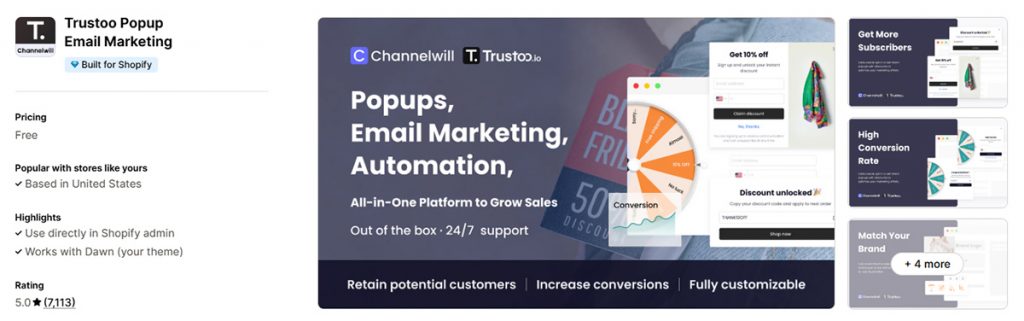
The platform also connects subscriber data automatically to Shopify and supports cart recovery automation as part of your email marketing strategy.
Define Your Email Remarketing Goals
Before opening a doc to create content for your email campaigns, set your goal.
We suggest that you focus on these three simple questions:
- What specific action do you want subscribers to take after reading your email?
- What type of email will you use?
- How will you measure if it’s working?
For example, you might want cart abandoners to complete their purchase (action) by sending them a reminder email showing the exact items they left behind (email type). And you’ll consider it successful if 5-8% of them buy within 48 hours (measurement).
It might be tempting to set multiple goals. You know… to increase conversions faster. But that is counterproductive.
Imagine you launched cart recovery emails, abandonment campaigns, and win-back sequences all at once. You’d have to monitor different metrics and think of improvements for each, too. How hectic will that be for you and your team?
Build Effective Audience Segments
Segmentation works because sending generic emails doesn’t really capture what specific shoppers want or need. In fact, brands that take advantage of this strategy can increase their revenue by up to 760% (wow!).
But here’s the thing: You should also know how you’ll segment your audience, and you need specific behavioral data for better email remarketing. Here are some segments that actually work:
- Cart abandoners
- Product browsers for specific items
- Existing customers
- Highly engaged subscribers
- Inactive customers
You see, if you compare it to basic segmentations like age groups, gender, or location, behavioral segments tell you so much more about what someone might actually buy.
PRO-TIP: Use auto-segmentation for better and more accurate segments. Most email platforms can automatically sort your subscribers into groups based on what they actually do. It’s effective because it keeps your segments updated (no need for you to step in constantly).
Create Compelling Email Content
Your remarketing emails only work if people actually want to read them. The best ones feel like natural follow-ups to what someone was already doing on your site, not generic promotional blasts.
Of course, we have to start with a good subject line. It should reference what the person actually did, like leaving a specific item in their cart or browsing winter coats.
Your email body should get to the point quickly because people scan emails more than they read them. Show the exact product they were interested in and explain why coming back makes sense (maybe it’s back in stock, on sale, or running low).
Another thing you need to add is a CTA (call-to-action) button. Don’t forget to make it visible and clear.
Remarketing Content Examples from Top Brands
Here are examples from successful ecommerce brands and marketplaces:
- Nike’s back-in-stock email uses “Look who’s back” as their subject line and shows the exact shoe the customer viewed before. They mention free shipping upfront and suggest similar products below to increase order value.
- ASOS takes a playful approach to win-back emails with “It’s not you, so it must be us?” They offer 20% off to inactive customers, but make it feel conversational with multiple response options.
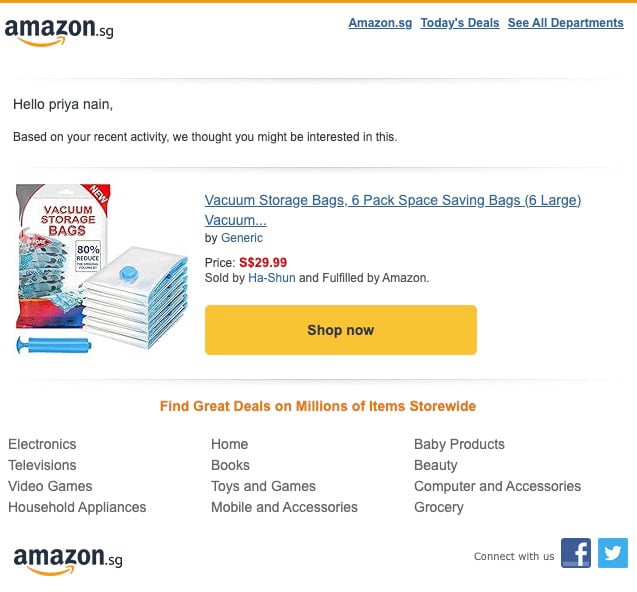
- Amazon’s browse abandonment emails personalize recommendations based on what you recently looked at, keeping the message simple with just “Shop now” buttons.
Set Up Automated Email Sequences
Automation makes email remarketing manageable for ecommerce store owners like you. There are so many things you need to do daily, and even with a team, they also have urgent tasks that need attention.
Email automations can save you that time while still paying attention to your “retrievable” revenue. It allows you to send emails on schedule, be consistent, and reach customers at the best time.
Let’s say you ran a jewelry store and you got 200+ people browsing engagement rings in a week. Your goal is to convert at least 15-20% of them into customers. So, you set up a separate email automation sequence for cart abandoners and browsers. Within a few months, you could reach your goal because of the timely follow-ups for every interested person.
You can actually automate various remarketing emails. But some of the common ones are:
- Post-purchase recommendations
- Cart and browse abandonment reminder emails
- Win-back campaigns
Test, Analyze, and Optimize
Let’s end this “how-to” list with a crucial step: testing and optimizing your emails. It’s a must to review and make changes to your emails (even when you already found what works).
But which parts of your emails should you test? Everything. Your subject line, call-to-action, content, send times, etc. However, we don’t recommend doing all the changes at once.
You can start with one part. For example, try the subject line “Your cart is waiting” against something product-focused like “Those shoes you loved are still available” and see which gets more opens. Once you find a winner there, move on to testing the others.
After each change, check your metrics. Your open rates can increase if your subject line is good, and click rates go up if your content and CTA are effective.
Here’s how to optimize based on what you find:
- High opens, low clicks: Improve your email content or make call-to-action buttons more visible
- Good clicks, poor conversions: Review your checkout process or offer something more compelling
- Timing issues: Test sending cart reminders within one hour instead of waiting a full day
Best Practices for Remarketing Emails
We can’t let you go without sharing some of the best practices for email remarketing. Some of them are connected with mobile optimization, timing and frequency, personalization, and trust signals.
Here are more details on how to apply them, plus some more tips:
Optimize for Mobile
The first best practice we want to cover is mobile optimization. 70% of emails are opened on mobile devices, so if your remarketing email looks terrible on a phone, you’re basically throwing away potential sales.
You can make your retargeting emails more mobile-friendly by following these simple steps:
- Keep your layouts simple with single-column designs that don’t need zooming.
- Make buttons big enough that viewers can easily tap them.
- Write shorter subject lines (about 30-40 characters only) so they’ll be readable on mobile.
- Compress images to smaller files so your emails will load fast.
- Put your most important message at the top because mobile users scroll less.
Mind Timing and Frequency
We all know how timing affects the performance of your email marketing strategy, but there’s no universal best time. You have to find your own “sweet spot” based on your audience’s behavior.
Industry benchmarks are a good reference point, though. Twilio mentioned that Wednesday to Thursday between 9 AM and 12 PM works well for marketing emails. For abandoned cart emails? 1-4 hours after someone leaves their cart is a good time.
From there, you can observe how your audience responds and do some A/B testing. Try sending the same email at different times… or test different days of the week to see which gets better open rates and clicks.
Frequency is another thing that you have to figure out for your online store. But Omnisend mentioned that some ecommerce brands that found steady engagement send 1-3 marketing emails per week. You can consider that when scheduling your follow-up emails.
Just be careful not to send too many or too few emails. You can either annoy subscribers (and cause them to unsubscribe) or they might forget about your brand.
Implement Personalization
SmarterHQ found that 72% of customers only engage with personalized messages that match their interests. We can’t blame them because most people’s inboxes are packed with too many promotional emails (even we’re getting tired of them).
So, you have to learn how to send personalized content. Right now it’s more than just “Hey, [Customer’s Name]!” Instead, use the browsing history and user behavior data you already have. Here’s how you can create personalized messages with that info:
- Reference specific products your subscribers viewed or abandoned in their shopping cart
- Suggest items based on their purchase history
- Segment subscribers by their actions, like cart abandoners vs casual browsers
Let’s say that you want to set up personalized campaigns for different customer behaviors. You can send emails showing the exact items they left behind (with their photos and prices) for cart abandoners. Then, casual browsers can receive personal recommendations.
Use Urgency and Scarcity Wisely
Zippia found that email subject lines with urgency increase open rates by 22%. They are effective, but you have to be careful. Or else… your email might get flagged as spam.
Instead of saying “Last chance to buy,” try something like “Sale ends Sunday at midnight.” Give specific information that your customers can verify.
We also suggest you avoid these overused words (and try the alternatives we provided):
| Phrases to Avoid | Better Alternatives |
| Act now | Available through May 15 |
| Limited time only | Offer ends at 11 PM tonight |
| Don’t miss out | Order by 3 PM for next-day shipping |
| Selling fast | Sale ends Sunday |
| Exclusive offer | Free shipping expires tomorrow |
Incorporate Trust Signals
Trust signals matter because 66% of buyers say they increase their likelihood to purchase a product. When people are hesitant about completing their purchase from your remarketing emails, showing credibility helps push them over the line.
The most effective trust signals include positive star ratings, customer reviews, and testimonials from real buyers. Besides that, badges like authorized seller certification, safe checkout, or money-back guarantees also work well to ease customer concerns.
Here’s one good example from Dyson.
Its email remarketing features badges like a 30-day money-back guarantee and free delivery options. These trust signals deal with common worries like “What if this doesn’t work for me?” or “Am I getting ripped off?”
Maintain a Healthy Email List
The quality of your email list affects the success of your entire email marketing performance.
One of our clients discovered this when their cart abandonment emails were barely getting a 12% open rate. After cleaning out inactive subscribers and switching to more effective signup forms, their engagement went to 32%!
If you want to enjoy the same results for your remarketing campaigns, here’s how you can keep your list healthy:
- Use double opt-in to verify real email addresses during signup
- Remove hard bounces and invalid addresses right away
- Remove email subscribers who have been inactive for over 6 months
- Segment inactive users so they don’t drag down your sender reputation
- Use automation to track engagement and flag inactive users automatically
Regularly cleaning your list can feel like a chore. But we promise that it’s worth it (especially when your shopping cart abandonment emails start converting).
Conclusion
So that ends our guide about email remarketing for ecommerce brands.
You already know all the important steps: capturing visitor emails, setting clear goals, building smart segments, writing compelling content, and automating your sequences. Plus, you’ve got some bonus best practices, too!
It’s time to build a more solid email marketing strategy that actually recovers lost sales. You can start by collecting emails from visitors who are about to leave your site.
Ready to turn those anonymous browsers into paying customers? Trustoo makes it simple to capture emails with exit-intent popups and automate cart recovery campaigns.

Content Director | 9+ years decoding B2C & B2B eCommerce, obsessed with SaaS and retail storytelling
Words are my weapon—crafting killer copy, decoding trends, and turning data into gold. When not strategizing: Coffee addict, pun enthusiast, and book lover. Ready to level up your eCommerce game? Let’s chat. ☕️